Keep Non-App Store Apps Updated On Your Mac
Apps installed outside the Mac App Store receive regular updates that include security fixes, performance improvements, and compatibility changes. Missing these updates can leave apps outdated, unstable, or vulnerable over time. App Updater scans your system for non-App Store applications and highlights available updates, making you review what’s needed and take action before issues arise.

How does App Updater help you?
App Updater scans the non-App Store apps installed on your Mac and informs you about available updates, the latest version, and what’s new. It reduces the effort of manually checking for updates and helps ensure your apps stay secure, stable, and compatible with the latest macOS updates.

Detect Updates
Installed non-App Store apps are checked for newer versions, and macOS update availability is identified by App Updater, allowing you to review and take action.

Update via App
Apps that are updated from their respective apps are launched by App Updater, allowing you to install the update using its built-in updater, ensuring updates are completed.

Review available app updates
A list of apps with available updates is listed with details such as the current version, new version, update size, and release information. This helps review changes and update the app.
Effortlessly Check for App Updates
Keeping the apps installed from outside the App Store up to date on Mac is important from a security, performance, and stability point of view. But manually tracking these updates across multiple apps can be time-consuming and easy to miss. App Updater simplifies the process by giving you clear visibility into available updates and allowing you to install them.
Manually Check Updates
Manually checking for updates requires opening each app individually and navigating through menus or settings to look for newer versions. With multiple apps installed, this approach becomes inefficient and difficult to manage.
App Updater, by bringing update awareness into one place, makes the process simple:
- Detect Updates - Scan installed non-App Store apps for newer versions
- Open App to Update - Launch apps that require updates to be completed internally
This keeps app update information clearly visible while ensuring updates are completed through the appropriate app.
How does App Updater work in Cleanup My System?
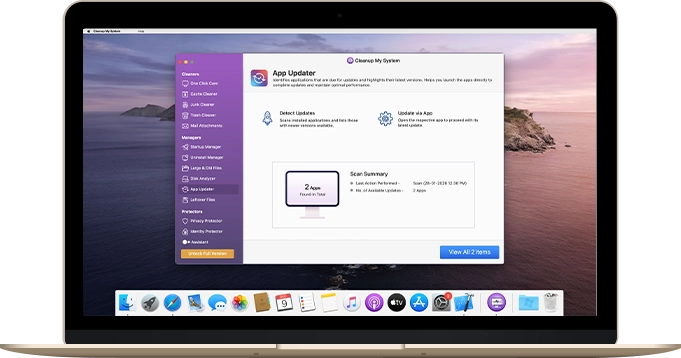
App Updater is a feature within Cleanup My System that scans your Mac for installed non-App Store applications and lists those with available updates. It centralizes updated information, allowing you to quickly identify which apps are outdated and what versions are available.

Open Cleanup My System
Launch Cleanup My System to access the features it offers to help manage and maintain your Mac. From the main interface, navigate to App Updater to begin scanning for available app updates

Click App Updater
Once opened, the App Updater scans your Mac for installed non-App Store apps and identifies those with available updates for newer versions. Updated details are presented clearly, allowing you to review version changes and proceed through the respective apps.
Your Personal Mac Cleaner
A simple way to manage app updates on Mac
App Updater helps you stay informed about updates for non-App Store apps installed on your Mac. By bringing updated information together and guiding you to the correct update path, it simplifies app maintenance while keeping the process clear and transparent.

System Requirements:
macOS 10.13 or later

Support:
Frequently Asked Questions
