Remove leftover app data from your Mac
Removing apps doesn’t always remove everything associated with them. Files created during app usage can remain stored on your Mac even after the app is uninstalled. Leftover Files helps you identify this unused app data so you can review and clean it safely, keeping your storage organized and clutter-free.

Find & Remove App leftover files
Leftover Files scans your Mac for data and files associated with uninstalled apps and groups the scan results. This makes it easy for you to clearly see the leftover app data that is taking up space and decide what to keep and delete.

Cache Files
Apps may leave behind cached data after they are removed. Leftover Files helps identify unused cache files so they can be reviewed and cleaned when no longer needed.

Support Files
Files that support an app's execution stay even after the app is uninstalled. The Leftover Files module lists such leftover support files, giving you the option to review and remove them to keep your Mac better organized.

Preference Files
Preference files created by apps can also remain on your Mac even when the app is uninstalled. Leftover Files helps you find these unused preference files so you can clean them and maintain an organized system environment.
Clean leftover app files to keep your Mac running smoothly
Unused app data occupies storage even after apps are removed. With Cleanup My System’s Leftover Files feature, review and clean these files in a few steps. This will help free up disk space, organize the system, leading to a smoother overall Mac experience over time.
Manually removing app traces
Many users, after uninstalling an app, try to remove app traces manually. This might sound simple, but they can never know where all related files created during app installation and use are stored. Some app data is stored in locations like:
- Applications folder
- Launchpad
That can be removed, but what about the ones you can’t see? Leftover app files are spread across multiple system locations, which can be easily overlooked. The Leftover Files module helps identify these unused files automatically, allowing you to clean them safely, free up storage space, and keep your data organized.

Remove app traces
Manually finding and removing leftover app files can be difficult. Cleanup My System makes this easier by helping you identify unused app data that remains after an app is removed. With everything brought together in one place, review and clean leftover files without the guesswork.

Open Cleanup My System
Cleanup My System brings together tools that help manage storage and keep your Mac organized. Within the app, the Leftover Files module focuses on data that remains after apps are uninstalled, helping you identify and remove clutter that’s often missed.

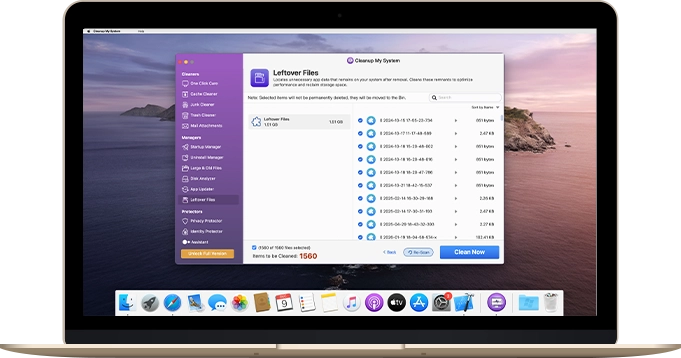
Click Leftover Files Module
The Leftover Files module scans your Mac for unused app data such as cache files, support files, and preference files associated with removed apps. Scan results are clearly displayed, allowing you to review detected items and clean them. By removing these files that are no longer needed, you free up storage space and keep your data better organized over time.
Your Personal Mac Cleaner
A safer way to cleanup after uninstalling apps
Leftover Files is designed to help you remove data that’s no longer needed. Review this data before cleaning and decide what to remove, helping keep your Mac organized without deleting any needed data.

System Requirements:
macOS 10.13 or later

Support:
Frequently Asked Questions
